vaSpread (FarPoint Spread) Explained: Features, Properties, VB6 Usage & Modern Alternatives
Featured Snippet Answer
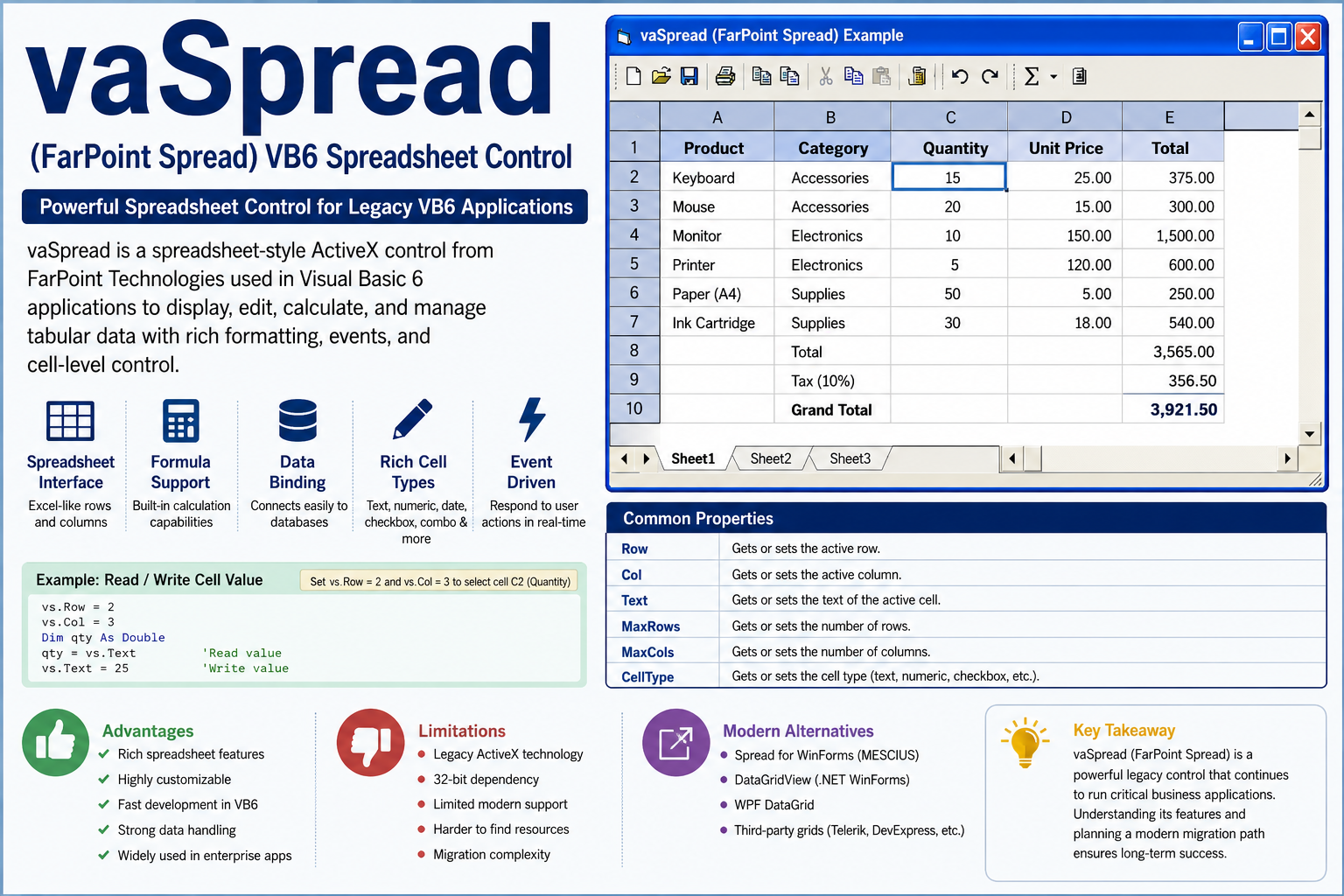
vaSpread is a spreadsheet-style ActiveX control developed by FarPoint Technologies for Visual Basic 6 applications. It allows developers to display, edit, calculate, and manage tabular data within desktop applications using rows, columns, cell properties, formulas, and event-driven programming.
Quick Answer Box
What is vaSpread?
- Legacy VB6 spreadsheet/grid control
- Originally developed by FarPoint Technologies
- Implemented as an ActiveX component
- Used for data entry, reporting, and business applications
- Commonly found in legacy enterprise software
- Modern successor: Spread for WinForms
Table of Contents
- What Is vaSpread?
- Why Developers Used vaSpread
- Key Features of vaSpread
- Common vaSpread Properties
- How vaSpread Works
- Typical Development Tasks
- Advantages and Limitations
- Modern Alternatives to vaSpread
- Migration Considerations
- Expert Tips for Maintaining Legacy vaSpread Applications
- FAQ
- Conclusion
What Is vaSpread?
vaSpread is a spreadsheet and grid control widely used in Visual Basic 6 (VB6) applications. It provided functionality similar to Microsoft Excel while allowing developers to embed spreadsheet behavior directly into Windows desktop software.
Before modern .NET grid controls existed, vaSpread became a popular choice for enterprise systems requiring:
- Data entry screens
- Financial reporting
- Inventory management
- Manufacturing systems
- Customer management applications
Many organizations still maintain business-critical applications that rely on vaSpread today.
Why Developers Used vaSpread
During the VB6 era, developers needed a powerful grid component that offered more functionality than standard controls.
vaSpread solved several common challenges:
| Requirement | vaSpread Solution |
|---|---|
| Data grids | Spreadsheet interface |
| Data entry | Cell-level editing |
| Reporting | Formatting and printing |
| Calculations | Formula support |
| Database integration | Data binding capabilities |
| User interaction | Rich event model |
This made it one of the most widely adopted third-party controls for desktop business software.
Key Features of vaSpread
Spreadsheet-Style Interface
Users interact with rows and columns much like a traditional spreadsheet.
Multiple Cell Types
Developers can configure cells as:
- Text fields
- Numeric values
- Dates
- Checkboxes
- Buttons
- Dropdown selections
Formula Support
Applications can perform calculations directly inside the grid without exporting data to Excel.
Event Handling
Developers can react to user actions such as:
- Cell changes
- Row selection
- Keyboard input
- Validation events
Data Binding
vaSpread can connect directly to database-driven applications, simplifying data presentation.
Common vaSpread Properties
Understanding vaSpread properties is essential when maintaining legacy applications.
Row Property
Controls the currently selected row.
Example use cases:
- Highlight records
- Navigate programmatically
- Process selected data
Col Property
Specifies the active column.
Developers often combine Row and Col to access specific cells.
Text Property
Retrieves or updates cell content.
Typical example:
- Reading user-entered values
- Updating reports dynamically
MaxRows Property
Determines the total number of rows displayed.
Used when:
- Adding records
- Loading datasets
- Creating dynamic grids
MaxCols Property
Controls the number of columns available within the spreadsheet.
CellType Property
Defines the behavior and format of individual cells.
Examples include:
- Text
- Numeric
- CheckBox
- ComboBox
How vaSpread Works
Unlike modern data grids, vaSpread often uses an imperative programming model.
A common workflow follows these steps:
- Select a row.
- Select a column.
- Read or write the cell value.
- Trigger events.
- Update the display.
This approach gave developers precise control over user interaction and data validation.
Typical Development Tasks
Changing Cell Values
Developers frequently update values programmatically after calculations or database operations.
Adding Rows
Applications can dynamically increase row counts to accommodate additional records.
Common scenarios:
- Order entry
- Inventory management
- Production tracking
Custom Navigation
Many VB6 systems implement custom keyboard navigation.
For example:
- Enter key moves to the next row
- Tab key skips protected cells
- Arrow keys trigger validation logic
Header Customization
Developers often modify column headers through sheet and column properties.
Typical customizations include:
- Dynamic captions
- Localization
- Runtime formatting
- User-specific labels
Advantages and Limitations
Benefits
Fast Development
Developers could create powerful data-entry screens quickly.
Rich Functionality
Many spreadsheet features were available out of the box.
Mature Ecosystem
Large numbers of VB6 applications adopted vaSpread.
Extensive Customization
Cell-level control enabled sophisticated business workflows.
Drawbacks
Legacy Technology
ActiveX technology is outdated.
Limited Documentation
Finding reliable resources has become increasingly difficult.
32-Bit Dependency
Many deployments require special compatibility considerations.
Migration Complexity
Organizations often face challenges when modernizing applications.
Modern Alternatives to vaSpread
Organizations planning modernization should evaluate newer technologies.
Spread for WinForms
The closest successor to vaSpread.
Best for:
- Existing Spread users
- Enterprise migration projects
- Spreadsheet-heavy applications
DataGridView
Built into .NET Windows Forms.
Advantages:
- Free
- Well documented
- Widely supported
WPF DataGrid
Suitable for modern desktop applications requiring advanced UI capabilities.
Third-Party Grid Controls
Popular options include:
- ComponentOne FlexGrid
- Telerik Grid
- Infragistics UltraGrid
- DevExpress GridControl
Migration Considerations
Before replacing vaSpread, evaluate:
Application Complexity
Determine how deeply the control is integrated.
Custom Business Logic
Many applications contain years of embedded validation rules.
User Workflows
Replicating familiar behavior often matters more than matching the interface.
Testing Requirements
Spreadsheet-heavy systems require extensive regression testing.
Expert Tips for Maintaining Legacy vaSpread Applications
Document Custom Behavior
Many implementations rely on undocumented business rules.
Audit Event Handlers
Most issues originate from event-driven logic rather than the grid itself.
Centralize Property Management
Avoid scattering Row, Col, and Text manipulation throughout the codebase.
Plan Migration Gradually
A phased migration usually reduces business risk compared to a full rewrite.
Key Takeaways
- vaSpread is a legacy spreadsheet control for VB6 applications.
- It provides advanced grid and spreadsheet functionality.
- Common properties include Row, Col, Text, MaxRows, and MaxCols.
- Many enterprise systems still depend on it.
- Modern alternatives offer better security, support, and maintainability.
- Migration planning is essential for long-term sustainability.
FAQ
What does vaSpread do?
vaSpread provides spreadsheet-style functionality inside desktop applications, allowing users to enter, edit, calculate, and manage tabular data.
Is vaSpread still supported?
Most vaSpread implementations are considered legacy technology. Organizations generally maintain existing applications or migrate to newer platforms.
Can I change column header values in vaSpread?
Yes. vaSpread includes properties and methods that allow developers to modify column headers, captions, and display text depending on the version being used.
Is vaSpread the same as Excel?
No. vaSpread provides spreadsheet-like functionality but operates as an embedded application control rather than a standalone spreadsheet program.
What replaced vaSpread?
Modern replacements include Spread for WinForms, DataGridView, WPF DataGrid, DevExpress GridControl, and Telerik Grid.
Should I migrate away from vaSpread?
If your application is business-critical and actively maintained, planning a migration is generally recommended due to long-term support, security, and compatibility concerns.
Conclusion
vaSpread remains an important part of many legacy VB6 applications because it delivered powerful spreadsheet functionality long before modern grid frameworks existed. Understanding vaSpread properties, events, and development patterns helps developers maintain older systems effectively while preparing for eventual modernization. Organizations that depend on vaSpread should focus on documenting business logic, reducing technical debt, and evaluating migration paths to supported technologies.







Post Comment