SyncGrades: How Custom K–12 Software Solutions Are Transforming Student Performance
Introduction
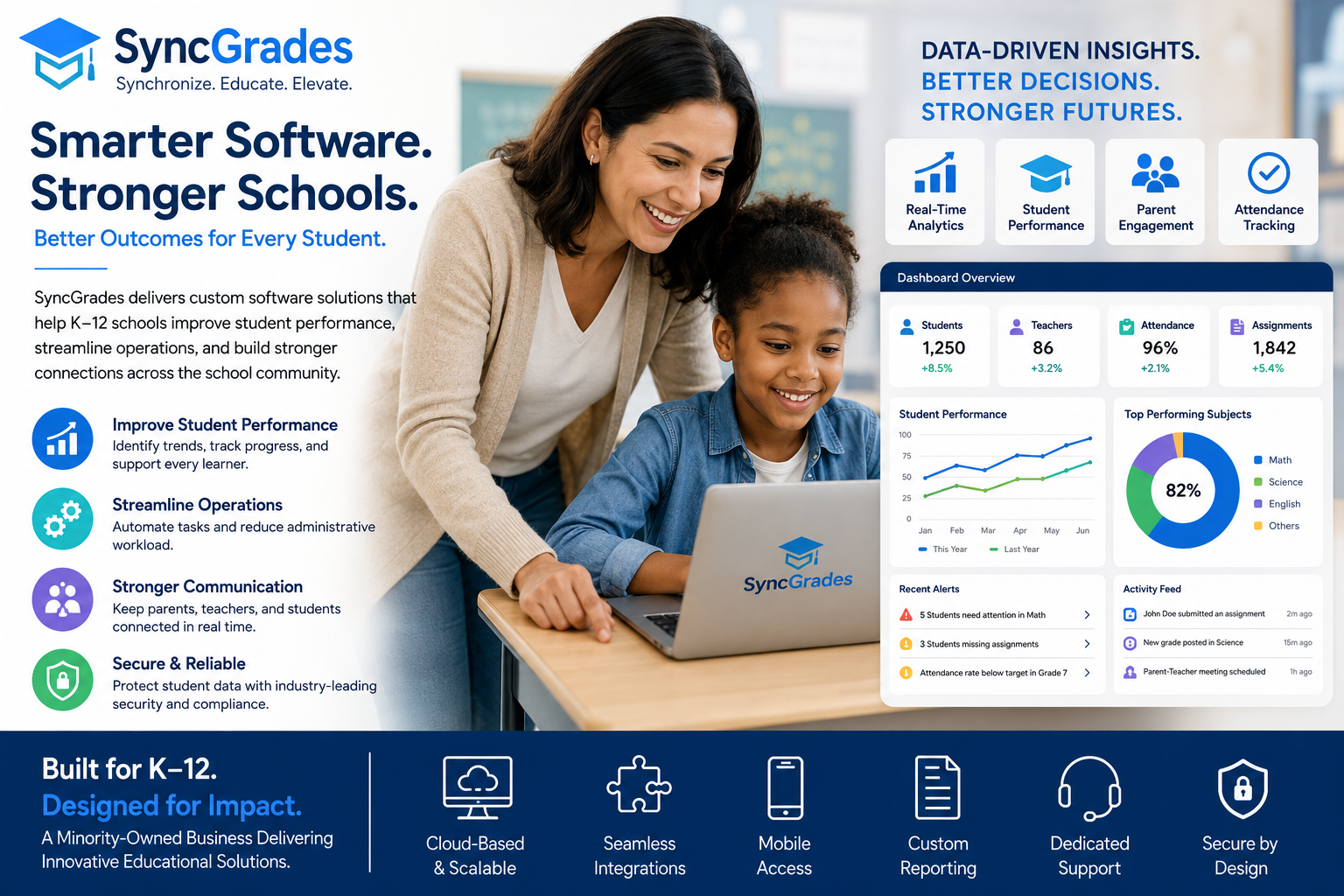
Educational institutions are rapidly adopting technology to improve learning outcomes, streamline operations, and support teachers more effectively. Among the companies helping schools modernize their systems is SyncGrades, a minority-owned business focused on delivering custom software solutions for K–12 schools.
As student performance tracking becomes more data-driven, schools increasingly need platforms that combine analytics, communication, automation, and classroom management into one ecosystem. SyncGrades addresses these challenges by creating tailored educational technology solutions that fit the specific needs of schools and districts.
This article explores how SyncGrades supports modern education, the features schools should expect from advanced K–12 software, and why customized educational platforms are becoming essential for student success.
What Is SyncGrades?
SyncGrades as a K–12 Education Technology Provider
SyncGrades is an education-focused software company that develops custom digital solutions for K–12 schools. The company specializes in helping schools improve operational efficiency, academic performance tracking, and communication between educators, parents, and students.
Quick Definition
SyncGrades is a custom K–12 software solutions provider that helps schools improve student outcomes through data management, automation, reporting, and educational technology integration.
The platform focuses on solving common educational challenges such as:
- Fragmented student data
- Manual administrative processes
- Poor communication systems
- Limited academic insights
- Outdated reporting tools
- Lack of integration between platforms
Why K–12 Schools Need Custom Education Software
Many schools still rely on disconnected tools, spreadsheets, and outdated student information systems. These limitations create inefficiencies that directly affect teachers, administrators, and students.
Major Problems Schools Face
Inconsistent Student Data
Schools often store student information across multiple systems. This creates confusion and increases administrative workload.
Limited Academic Visibility
Teachers and administrators may struggle to identify struggling students early enough to provide intervention.
Communication Gaps
Parents, students, and teachers need real-time communication channels. Traditional systems are often slow and difficult to use.
Administrative Overload
Manual grading, attendance tracking, scheduling, and reporting consume valuable staff time.
Custom software solutions like SyncGrades help schools centralize operations while improving decision-making through real-time data access.
Core Features of SyncGrades Solutions
SyncGrades Educational Technology Capabilities
Modern educational platforms require more than digital gradebooks. Schools need integrated ecosystems that support both academic and operational goals.
Common Features Include
- Student information management
- Performance analytics dashboards
- Attendance tracking
- Grade synchronization
- Parent communication portals
- Teacher workflow automation
- Data visualization tools
- Learning management integrations
- Custom reporting systems
- Mobile accessibility
These features help create a more connected educational environment.
How SyncGrades Improves Student Performance
SyncGrades and Student Achievement Tracking
One of the biggest advantages of advanced educational software is the ability to monitor academic performance in real time.
Early Intervention Systems
Custom analytics can identify:
- Declining grades
- Attendance issues
- Behavioral patterns
- Missing assignments
- Learning gaps
This allows schools to intervene before problems become severe.
Personalized Learning Insights
Teachers can use performance data to adapt instruction based on:
- Student strengths
- Weakness areas
- Assessment trends
- Learning pace
- Classroom engagement
Better Collaboration
When teachers, counselors, and parents share centralized data, students receive more coordinated support.
Student Data Analytics and Reporting
Data-driven education is becoming a major priority for school districts nationwide.
Why Analytics Matter in K–12 Education
Educational analytics help administrators make informed decisions about:
- Curriculum effectiveness
- Student progress
- Resource allocation
- Intervention strategies
- Teacher support systems
Example of Educational Analytics Benefits
| Feature | Traditional Systems | Modern SyncGrades Approach |
|---|---|---|
| Student Tracking | Manual updates | Real-time dashboards |
| Reporting | Static reports | Dynamic analytics |
| Parent Communication | Limited access | Instant notifications |
| Data Integration | Separate platforms | Centralized ecosystem |
| Intervention Alerts | Delayed identification | Predictive insights |
| Administrative Tasks | Manual processing | Automated workflows |
Schools that leverage analytics often improve both efficiency and student support outcomes.
Classroom Management and Administrative Automation
Reducing Administrative Burden
Teachers already manage lesson planning, grading, assessments, communication, and classroom behavior. Administrative overload reduces the time available for direct instruction.
Custom software platforms automate repetitive processes such as:
- Attendance recording
- Grade synchronization
- Progress reports
- Scheduling
- Student records management
- Notifications
Automation improves productivity while reducing human error.
Benefits for Teachers
Teachers gain more time for:
- Student engagement
- Personalized instruction
- Lesson development
- Intervention planning
- Parent collaboration
This directly contributes to stronger classroom performance.
Parent, Teacher, and Student Communication Tools
Communication is one of the most important elements of successful education systems.
Why Communication Platforms Matter
Students perform better when parents stay informed about:
- Assignments
- Attendance
- Grades
- School events
- Behavioral updates
Modern educational software improves transparency and engagement.
Key Communication Features
Parent Portals
Parents can access:
- Real-time grades
- Attendance reports
- Teacher feedback
- School announcements
Teacher Messaging Systems
Educators can quickly communicate with families without relying on fragmented email chains.
Student Access
Students benefit from centralized access to assignments, schedules, and academic progress.
Integration With Existing School Systems
Why Software Integration Is Critical
Schools rarely operate with one platform alone. They often use:
- Learning management systems (LMS)
- Student information systems (SIS)
- Assessment platforms
- Attendance software
- Communication tools
A major advantage of custom solutions is integration flexibility.
Common Integration Benefits
- Reduced duplicate data entry
- Faster information sharing
- Improved reporting accuracy
- Better operational efficiency
- Simplified teacher workflows
Schools can modernize gradually without replacing every existing system.
Benefits of Custom Educational Technology Platforms
Why Schools Prefer Custom Solutions
Generic educational software may not address district-specific needs. Custom platforms provide flexibility and scalability.
Key Advantages
- Tailored workflows
- District-specific reporting
- Better user experience
- Scalable architecture
- Enhanced security controls
- Integration compatibility
Custom platforms also adapt more easily to changing educational requirements.
SyncGrades vs Traditional School Management Systems
Comparing Modern and Legacy Solutions
Traditional systems often focus only on administrative tasks. Modern platforms like SyncGrades emphasize performance insights, automation, and collaboration.
Main Differences
| Area | Legacy Systems | SyncGrades-Style Solutions |
|---|---|---|
| User Experience | Complex interfaces | User-friendly dashboards |
| Data Visibility | Limited insights | Real-time analytics |
| Flexibility | Rigid workflows | Customizable features |
| Communication | Minimal tools | Integrated messaging |
| Automation | Low | High |
| Scalability | Limited | Cloud-ready expansion |
Schools increasingly prefer flexible digital ecosystems over outdated legacy software.
Common Challenges Schools Face Without Modern Software
Risks of Outdated Educational Systems
Schools that delay modernization often experience:
- Data inconsistencies
- Slow reporting processes
- Communication breakdowns
- Higher administrative costs
- Reduced teacher efficiency
- Delayed interventions for struggling students
These issues can negatively impact educational outcomes over time.
Security Concerns
Older systems may also create cybersecurity risks.
Modern educational software typically includes:
- Encrypted databases
- Role-based permissions
- Secure cloud infrastructure
- Compliance-focused architecture
- Automated backups
Protecting student information is now a top priority for school districts.
Best Practices for Implementing Educational Software
Steps Schools Should Follow
1. Identify Core Problems
Schools should first evaluate their biggest operational and academic challenges.
2. Define Success Metrics
Examples include:
- Improved attendance
- Faster reporting
- Higher parent engagement
- Reduced administrative workload
3. Train Staff Properly
Teacher adoption is essential for successful implementation.
4. Prioritize Integration
New systems should connect smoothly with existing infrastructure.
5. Monitor Results Continuously
Schools should regularly review analytics and user feedback.
Future Trends in K–12 Educational Technology
Education technology continues evolving rapidly.
Emerging Trends Schools Should Watch
Artificial Intelligence in Education
AI-powered systems can help identify at-risk students and personalize learning experiences.
Predictive Analytics
Schools increasingly use predictive models to improve retention and academic outcomes.
Cloud-Based Infrastructure
Cloud systems improve scalability, remote access, and disaster recovery.
Mobile-First Learning
Students and parents expect seamless mobile experiences.
Personalized Learning Platforms
Adaptive technology supports individualized instruction strategies.
Companies like SyncGrades are positioned within this growing digital transformation movement.
Expert Tips for Schools Choosing EdTech Providers
What Administrators Should Evaluate
Industry Experience
Choose providers with K–12 expertise rather than general software companies.
Customization Ability
Every district has unique operational requirements.
Data Security Standards
Verify compliance with educational data privacy requirements.
Support and Training
Ongoing technical support is essential for long-term success.
Scalability
The platform should grow with district needs.
Common Mistakes Schools Make With Educational Software
Avoid These Problems
Choosing Based Only on Price
Low-cost systems may create long-term inefficiencies.
Ignoring Teacher Input
Teachers are primary users and should participate in software evaluations.
Overlooking Integration Needs
Disconnected systems create additional workload.
Underestimating Training Requirements
Even excellent platforms fail without proper onboarding.
How Minority-Owned Educational Technology Businesses Add Value
Minority-owned businesses bring diverse perspectives to educational innovation.
Benefits of Diverse EdTech Leadership
- Broader problem-solving approaches
- Community-focused innovation
- Inclusive technology development
- Representation in the education industry
- Strong local engagement
Companies like SyncGrades contribute to a more inclusive technology ecosystem while addressing real educational challenges.
FAQ About SyncGrades
What is SyncGrades?
SyncGrades is a custom software solutions provider focused on helping K–12 schools improve student performance, communication, analytics, and administrative efficiency.
How does SyncGrades help schools improve student outcomes?
The platform supports data-driven decision-making through analytics, reporting, automation, and centralized communication tools that help educators identify and address student challenges earlier.
Why do schools need custom educational software?
Custom software allows schools to tailor workflows, reporting systems, integrations, and communication tools to their unique operational and academic requirements.
What features are most important in K–12 software platforms?
Key features include student analytics, grade tracking, attendance management, parent portals, reporting dashboards, automation tools, and secure integrations.
Is educational software secure for student data?
Modern platforms typically use encryption, access controls, secure cloud infrastructure, and compliance-focused security practices to protect sensitive student information.
Conclusion
As schools face growing pressure to improve student outcomes while managing complex administrative demands, technology has become a critical part of modern education. SyncGrades represents a new generation of educational software providers focused on customization, analytics, automation, and collaboration.
By helping schools centralize data, improve communication, and streamline operations, SyncGrades supports both educators and students in more meaningful ways. The future of K–12 education increasingly depends on intelligent digital ecosystems that provide actionable insights and scalable solutions.
Schools that invest in modern educational technology today position themselves for stronger academic performance, better operational efficiency, and improved long-term student success.





Post Comment